Tầng 8, Tòa nhà Sannam, số 78 Phố Duy Tân, P.Dịch Vọng Hậu, Q. Cầu Giấy, Tp. Hà Nội, Việt Nam

Advisory
Direct: 0904565626
Advisory
Direct: 0904565626

Learn what an access control system is, including door access control devices, authentication methods, and solutions for managing access permissions in different buildings.
An access control system helps authenticate users, control door access permissions, and record access history in restricted areas. The solution is used in buildings, offices, factories, and technical areas where access needs to be managed by user, schedule, or security level. So, what devices make up an access control system, how does it work, and how should the appropriate access control solution be selected?
An Access Control System is a combination of devices and software used to manage access permissions to controlled areas. The system determines whether a user is authorized to pass through a specific door or entrance at the requested time.
The three basic functions of the system include:
User authentication: Receiving credentials from cards, PIN codes, or biometric devices.
Access authorization: Verifying credentials against predefined access permissions.
Door control: Granting or denying door unlocking based on the verification result.
Unlike surveillance cameras, which capture visual information, an access control system directly manages door access permissions. Meanwhile, an intrusion alarm system focuses on detecting abnormal intrusion activities or conditions.
These systems can be integrated to support security management, but their functions and operating principles are not entirely the same.
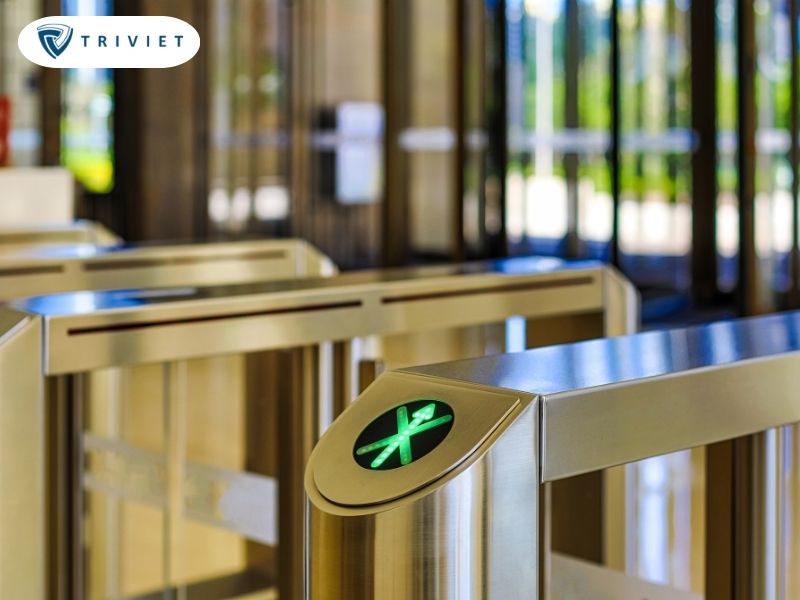
A complete access control system requires authentication devices, controllers, door locks, and status monitoring components. Depending on the building's scale, the system may operate independently at individual doors or connect to centralized management software.
A door controller processes access permissions and controls devices involved in door locking and unlocking operations.
When receiving information from a reader, the controller verifies access permissions against stored data and configured settings. If the request is valid, the device activates an output to unlock the door for a specified period.
Common controller functions include:
Receiving data from readers.
Verifying access permissions.
Controlling electric locks.
Receiving door status signals.
Recording access events.
Exchanging data with management software.
Depending on the design, a controller may manage one door, two doors, or multiple doors. The number of supported readers does not necessarily equal the number of doors, as a single door may use readers on both sides.
When selecting a controller, it is necessary to check the number of supported doors, reader ports, inputs and outputs, event storage capacity, and software connectivity.
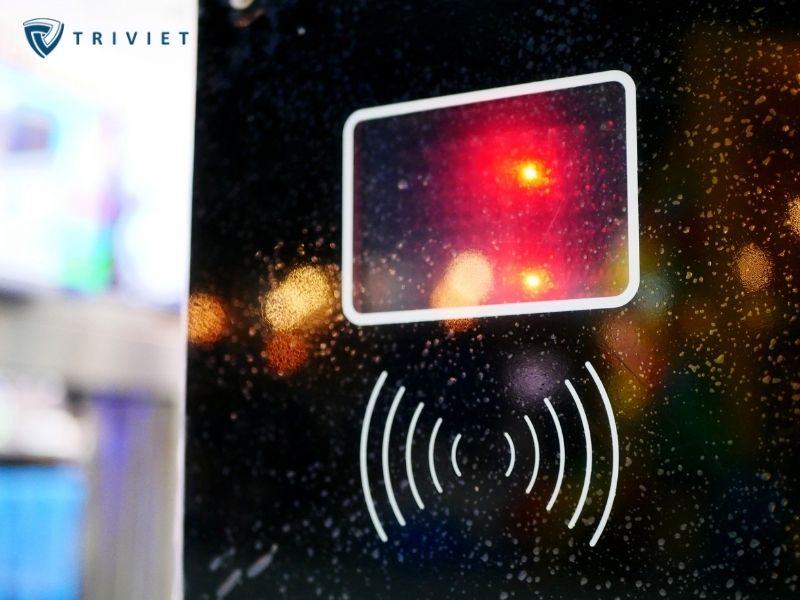
A reader receives authentication information when a user requests access through a door.
Common authentication methods include:
RFID card readers: Receive information from compatible cards or identification devices.
PIN code readers: Allow users to enter a numerical code for authentication.
Fingerprint recognition devices: Authenticate users based on fingerprint characteristics.
Facial recognition devices: Use facial data for authentication according to the device's capabilities.
Some readers support multiple authentication methods on the same device. However, supporting multiple unlocking methods does not necessarily mean that the system requires multi-factor authentication.
For areas requiring stricter access control, the system may be configured to require a combination of authentication factors if supported by the devices and software.
An electric lock is an actuating device that locks or releases a door in response to a control signal. Common lock types include:
Electromagnetic Locks
Electromagnetic locks use magnetic force to keep doors closed. Many electromagnetic locks release when power is lost, so power supply arrangements and safety requirements at the installation location must be evaluated.
Electric Bolt Locks
Electric bolt locks use a bolt mechanism to secure or release a door. Depending on the product, their behavior during a power failure may differ. Lock selection must be suitable for the door structure, frequency of use, and emergency egress safety requirements.
In particular, lock mechanisms must not be selected solely based on security requirements while overlooking the need to open doors during fires or emergencies.
In addition to readers and electric locks, access control systems commonly use supporting devices to monitor door status.
Door Status Sensors
Magnetic door contacts are used to determine whether a door is open or closed. The controller may use these signals to detect conditions such as doors being held open for too long or opened outside the authorized procedure.
Exit Buttons
Exit buttons may be installed on the inside of a door, allowing users to request unlocking without presenting a card, depending on the access control arrangement.
Request to Exit (REX) Devices
A Request to Exit (REX) function may use a button, sensor, or suitable device to register an exit request.
It is important to distinguish REX functionality from emergency egress solutions. Safe evacuation must comply with the safety design and applicable regulations and must not depend solely on software or an electronic controller.
Access control management software is used to configure users, establish access permissions, and monitor the operation of connected doors.
Depending on the platform, the software may support:
Creating user accounts and managing credentials.
Assigning permissions by door or area.
Configuring access schedules.
Recording access history.
Monitoring door status.
Managing multiple controllers within one system.
For example, in an office building, employees may be granted access to work areas during specified hours, while the server room is restricted to authorized technical personnel.
The software allows administrators to manage permissions centrally instead of manually configuring each door.

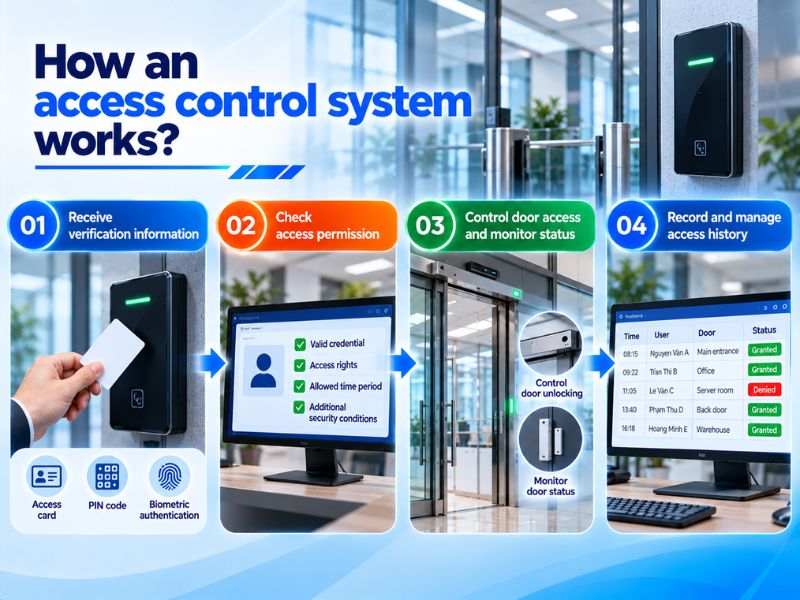
The operating principle of an access control system is based on receiving authentication information, verifying permissions, and controlling locking devices. After each access attempt, the system may record an event for management purposes.
Essentially, an Access Control system performs a sequence of processes from user identification and access permission verification to door control and event recording.
When users want to pass through a door, they present credentials using a supported authentication method.
For example, users may present a card to a reader, enter a PIN code, or complete biometric authentication.
The reader receives the data and forwards the necessary information to the processing component. Depending on the architecture, authentication may take place at the terminal device, controller, or through related system components.
After receiving the information, the system checks the conditions required to authorize door unlocking.
These conditions may include:
Valid authentication credentials.
User authorization for the corresponding door.
Access time within the permitted schedule.
Additional security conditions based on the configuration.
For example, an employee may be authorized to enter the general office area but not the server room. When using the same card at both locations, the system may produce different results based on the assigned permissions.
If the request is valid, the controller activates an output to operate the lock according to its configuration.
After the door opens, the status sensor may send information to the controller to monitor opening and closing operations.
If the door remains open longer than permitted or an abnormal condition occurs, the system may generate an event or alarm when appropriately configured.
If the user is not authorized, the controller will not issue an unlocking command for that access request.
After each authentication attempt, the system may store event information such as:
Access time.
Door or access location.
User information or identification code.
Access granted or denied result.
Related door status events.
Data may be stored in the controller and synchronized with management software when connectivity allows.
Using this history, management personnel can review access activities and identify events requiring further investigation.
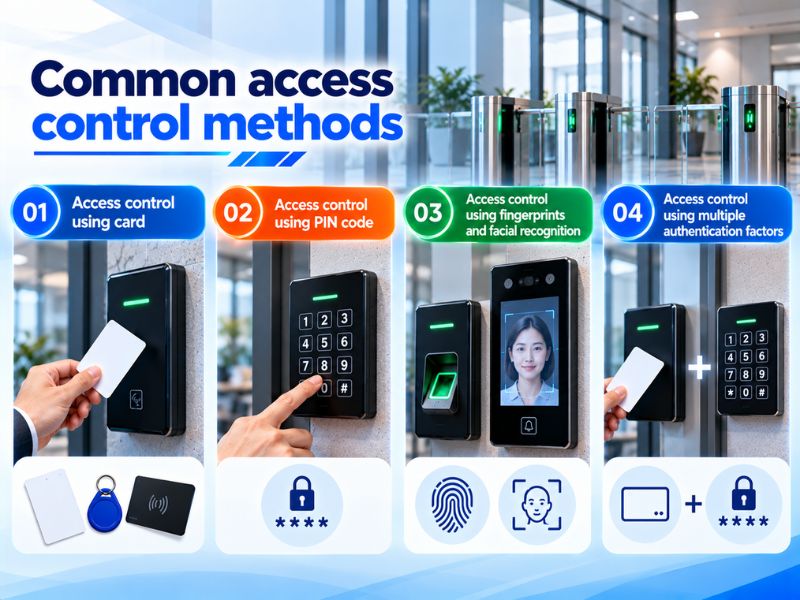
Each authentication method has distinct characteristics regarding usability, equipment requirements, and security levels. Selection should align with the nature of the area and user management procedures.
Card-based access control uses identification cards or compatible devices to request door unlocking. Users present their cards to a reader, and the system receives the information and verifies access permissions.
One advantage of this method is the convenience of issuing, modifying, or revoking access permissions.
However, the security level depends on card technology, authentication mechanisms, and resistance to cloning. Systems that rely only on simple identification codes may be vulnerable to duplication or unauthorized use.
This method uses a numerical code entered on a keypad for authentication. A PIN may be used independently or combined with a card, depending on the configuration.
One advantage is that users do not necessarily need to carry a physical card. However, PIN codes may be exposed if shared or observed during entry.
Therefore, appropriate procedures for managing, changing, and revoking PIN codes are necessary.
Biometric devices use users' biological characteristics for authentication. This method can reduce reliance on cards or numerical codes, but its effectiveness depends on the equipment and actual operating conditions.
For example, fingerprint readers may be affected by dirty or injured fingers. Facial recognition devices should be evaluated for lighting conditions, installation positions, and anti-spoofing capabilities.
In addition to technical considerations, the collection and processing of biometric data must comply with personal data protection regulations.
Multi-factor authentication requires users to provide at least two authentication factors from different categories, such as a card and a PIN.
For example, in a server room, users may be required to present a valid card and enter a PIN before being granted access.
This method adds another verification layer compared with using a single authentication factor.
However, it is important to distinguish between systems that support multiple authentication methods and systems that require multiple factors during the same access attempt.
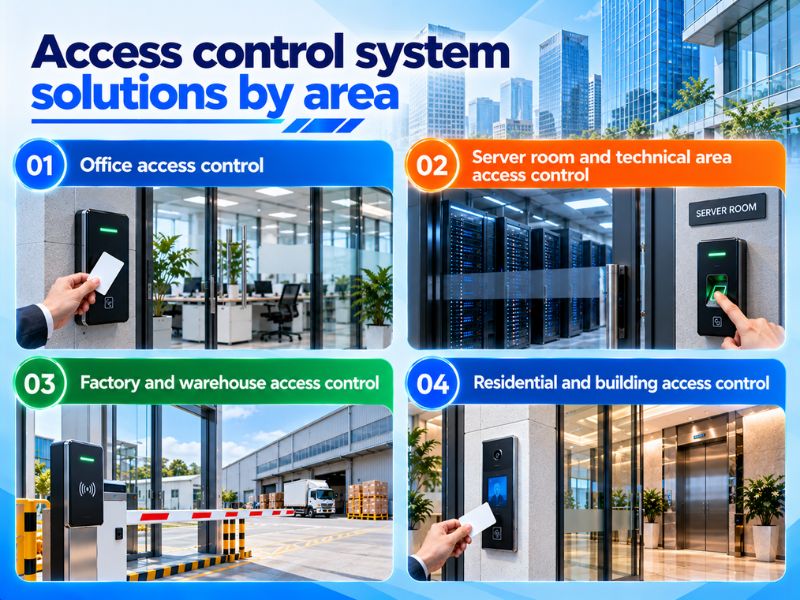
Not every door in a building requires the same access control configuration. Depending on security levels, frequency of use, and user groups, an access control system should be designed to suit each location.
In offices, an access control door system is commonly used to manage main entrances, work areas, and rooms with restricted access. The solution may use card readers combined with controllers and electric locks.
Through management software, administrators can assign permissions by department or work schedule.
For example, administrative employees may be allowed to enter common office areas, while document storage rooms are restricted to authorized personnel.
For visitors, temporary access permissions or appropriate visitor management procedures may be implemented according to the system's capabilities.
Server rooms, control rooms, and other critical technical areas often require stricter access control.
At these locations, the system may use:
Card readers or suitable authentication devices.
Controllers capable of recording events.
Door status sensors.
Access permissions assigned by personnel group.
Additional authentication when necessary.
For example, a server room may allow access only to authorized IT personnel during specified time periods or under defined conditions.
Access history helps management personnel review when access requests were made and which accounts were involved.
In factories, access control requirements may differ between production areas, warehouses, technical rooms, and restricted areas. Access permissions may be assigned by department or work shift.
For example, warehouse employees may be authorized to enter storage areas, while other personnel may enter only when appropriate permissions have been granted.
For doors with high usage frequency or specialized operating environments, readers, locks, and supporting devices must be selected to suit actual conditions.
In apartment buildings and other multi-use buildings, access control systems may be used to manage common entrances, amenity areas, and restricted spaces.
Management software allows users to be organized into groups, such as residents, operations staff, or technical personnel.
Depending on the solution, the door access control system may be integrated with elevator access control equipment to restrict access to specific floors.
However, integration capabilities must be verified based on the actual devices, protocols, and control arrangements.
To ensure that the system meets operational needs, equipment selection should be based on door surveys, usage procedures, and security requirements. In addition to unlocking capabilities, system behavior during incidents must also be considered.
Before selecting a controller, it is necessary to determine the number of doors requiring access control and the number of readers used at each door.
For example, a door with entry-only access control may use one reader on the outside and a request-to-exit button on the inside. Meanwhile, a door with access control in both directions may require two readers.
In addition to the current number of doors, future expansion requirements should be anticipated.
Specifications to check include:
Number of doors supported by the controller.
Number of reader ports.
Number of inputs and outputs.
User and event storage capacity.
Software licensing limits.
Ability to connect multiple controllers.
Planning these requirements during the design stage helps minimize equipment changes when expanding the system.
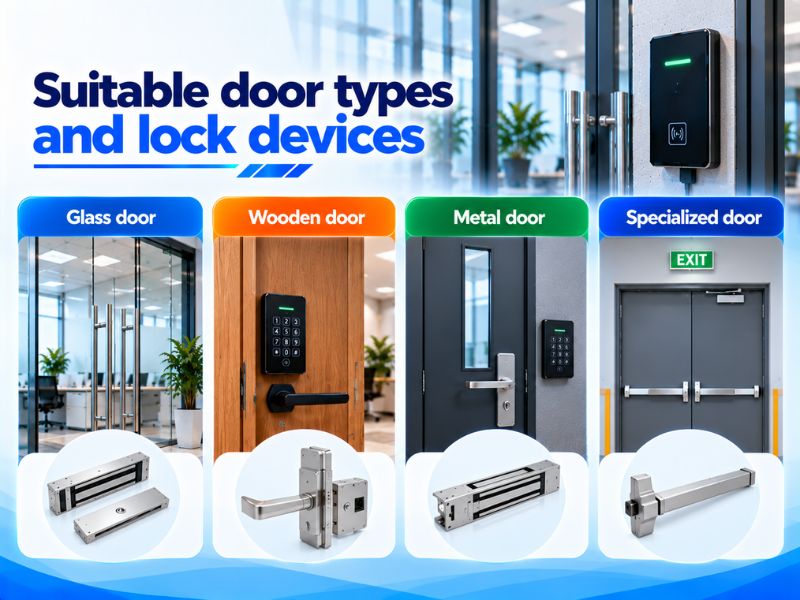
Each door type has different mechanical characteristics and installation requirements. Glass, wooden, metal, or specialized doors may require corresponding locks and accessories.
When selecting locks, consider:
Door structure and opening direction.
Lock installation position.
Frequency of opening and closing.
Power supply for the lock.
Operating behavior during power failure.
Emergency egress and fire safety requirements.
For doors located along emergency escape routes, locking solutions must ensure safe egress in accordance with applicable regulations. Software failures or network disconnections must not prevent occupants from evacuating.
Controllers may connect to readers and servers through different interfaces, depending on the equipment. Common protocols or interfaces include OSDP and Wiegand.
OSDP supports bidirectional communication and provides security mechanisms when properly configured, while Wiegand is a data transmission interface used in many traditional access control systems.
During design, connection distances, cable types, and compatibility between readers and controllers must be checked.
Additionally, it is necessary to determine whether the system can continue verifying access permissions when disconnected from the server. Standalone operation depends on the architecture and data stored in the controller.
Backup power must also be considered according to operational requirements and the building's safety strategy.
Access control systems manage user data and access history, so appropriate protection measures are necessary.
Important considerations include:
Assigning administrator account permissions.
Revoking access when employees leave or change departments.
Managing lost cards.
Securing connections between devices.
Reviewing configuration change logs.
Managing data retention periods.
For systems using fingerprints or facial recognition, the collection, storage, and processing of biometric data must be evaluated according to legal requirements.
In buildings with multiple security systems, access control can be integrated with a security camera system or centralized management platform when supported by the devices, protocols, and software.
For example, when an access request is denied, the software may link the event information to the camera monitoring the corresponding door if both systems support integration.
Additionally, the door access control system may coordinate with the fire alarm system according to the design to ensure safety requirements are met during incidents.
Integration requires verification of device compatibility, protocols, and control logic. Functions related to emergency egress must comply with the approved fire safety plan.
Tri Viet Controls provides equipment categories for access control systems, including controllers and related components within its product portfolio.
When exploring solutions, customers may consider access control equipment from brands such as Johnson Controls, Kantech, or Software House, depending on the available product range and configurations.
To select a suitable solution, the following requirements should be clearly defined:
Number of doors to be managed.
Authentication methods.
Number of readers at each door.
Lock types and door structures.
User access permission requirements.
Software connectivity capabilities.
System integration and expansion needs.
For buildings with multiple controlled areas, selecting compatible equipment and establishing a management strategy from the beginning helps simplify deployment, operation, and maintenance.
An access control system plays an important role in managing access permissions, controlling doors, and recording activity history in areas requiring restricted access. An effective solution requires the right combination of controllers, readers, electric locks, and software while meeting both security and emergency egress safety requirements.
Contact Tri Viet Controls for advice on access control equipment and system solutions tailored to the scale, door characteristics, and management requirements of your building.








Please leave your information, we will contact you to complete the order!