Tầng 8, Tòa nhà Sannam, số 78 Phố Duy Tân, P.Dịch Vọng Hậu, Q. Cầu Giấy, Tp. Hà Nội, Việt Nam

Advisory
Direct: 0904565626
Advisory
Direct: 0904565626
Learn about video surveillance management software, including live viewing, video retrieval, alarm management, and practical applications in various facilities.
Video surveillance management software helps centralize video data, manage cameras, monitor events, and retrieve recordings through a unified platform. The solution is particularly useful when cameras are deployed across multiple floors, areas, or buildings. So, how does VMS software work, what features does it provide, and how is it applied in practice?
Video surveillance management software is a platform used to connect, manage, and access video data from compatible cameras and recording devices. In practice, camera management software is commonly referred to as VMS (Video Management Software or Video Management System).
Instead of accessing each camera or recorder separately, operators can use a single interface to view live footage, search recordings, monitor events, and manage access permissions.
In a video surveillance system, it is important to distinguish three main components:
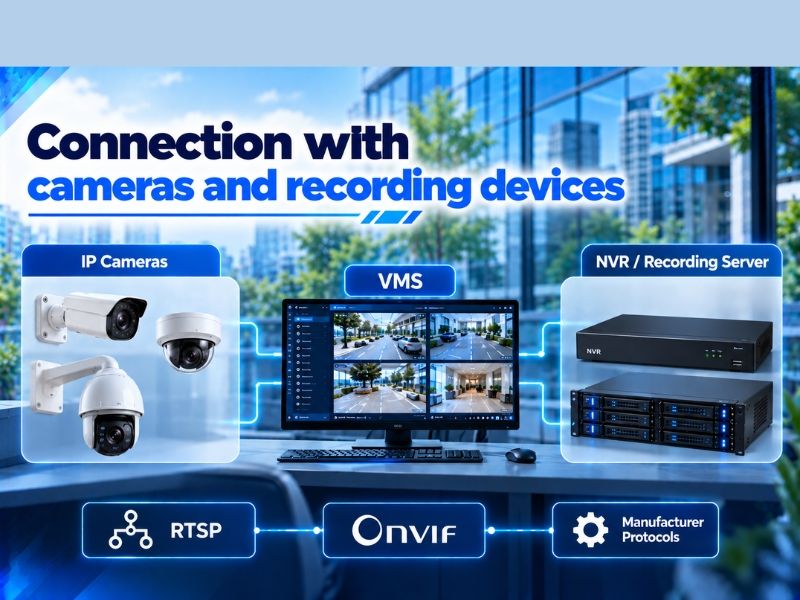
IP Cameras: Capture images, encode video, and transmit video data over a network.
NVR (Network Video Recorder): Receives and records video streams from compatible cameras.
VMS Software: Organizes and manages video data while providing an interface for accessing footage from the system.
Depending on the architecture, VMS software may manage IP cameras directly, connect to recording devices, or use dedicated recording servers.
In a security camera system, VMS acts as the management layer that allows operators to access data from cameras and recording devices through a centralized interface.
For facilities with numerous cameras, multiple personnel groups, or frequent video retrieval requirements, dedicated management software makes surveillance operations more convenient.
To enable operators to monitor and retrieve footage, VMS software must connect to cameras, recording devices, and storage systems. Its operation involves receiving video streams, organizing data, and providing a management interface.
Video surveillance management software can connect to IP cameras, NVRs, or recording servers through supported interfaces and protocols.
In an IP camera system, video is encoded at the camera and transmitted over the network to the receiving component.
Depending on the devices and software platform, connections may use protocols or integration standards such as RTSP, ONVIF, or manufacturer-specific interfaces.
However, supporting the same connection standard does not guarantee access to every feature. Functions such as PTZ control, event reception, or video analytics data must be checked for specific compatibility.
Once connected, VMS software organizes cameras according to the facility's management configuration.
Operators can group devices by:
Building or zone.
Floor and functional area.
Installation location.
Camera groups requiring monitoring.
Management responsibilities of individual departments.
For example, in an office building, cameras may be divided into groups such as the main lobby, corridors, basement, and technical areas.
Organizing data by area allows personnel to locate the cameras they need without checking the entire device list.
Video surveillance management software provides an interface for users to view live footage and access recorded video.
Depending on the architecture, video may be stored on NVRs, recording servers, or dedicated storage systems.
When an incident requires investigation, personnel can select the relevant camera, specify a time range, and play back the corresponding footage.
Search capabilities depend on the recorded data and the functions supported by the software. Some platforms allow event-based searches, while basic systems primarily support searches by camera and time.
In addition to displaying footage, VMS software supports various functions for security surveillance operations. Specific features depend on the platform, software version, and integrated equipment.
One of the fundamental features of video surveillance management software is displaying footage from multiple cameras through a single interface.
Security personnel can select the cameras they need to monitor and arrange video windows according to their assigned areas.
For example, in a building's security control room, surveillance monitors may simultaneously display footage from the lobby, entrances and exits, corridors, and basement.
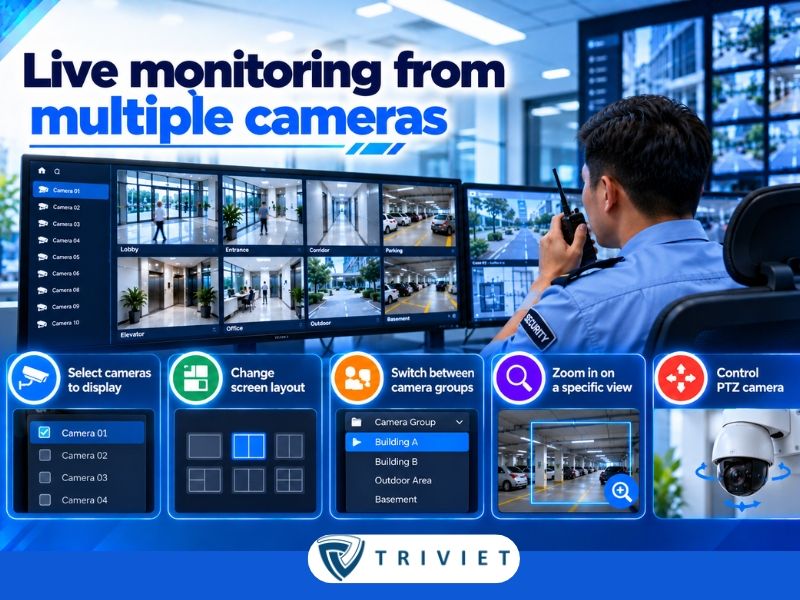
Depending on the software, users may be able to:
Select cameras for display.
Change screen layouts.
Switch between camera groups.
Enlarge specific video windows.
Control PTZ cameras when supported by the devices and permitted by access rights.
The number of cameras that can be displayed simultaneously also depends on workstation processing capabilities, network bandwidth, and video stream configurations.
When an incident needs to be verified, video retrieval is an important function of VMS software.
Instead of reviewing an entire recording, operators can search using supported criteria.
Common operations include:
Selecting a camera or camera group.
Specifying a date and time range.
Playing back recorded footage.
Pausing or jumping to a specific time.
Exporting video clips when the user has appropriate permissions.
For example, when investigating an incident that occurred in the basement during the afternoon, personnel can select the basement camera group and retrieve recordings from the relevant period.
If the software supports event-based searches, locating the relevant footage may be easier. However, this function requires corresponding event data from cameras or integrated systems.
Video surveillance management software can receive and display events generated by cameras or integrated devices.
In projects that require system integration, events from an access control system can be associated with video data when supported by the deployed platforms and communication interfaces.
Depending on the configuration, events may include:
Motion detection.
Camera disconnection.
Recording device failures.
Alarm signals from integrated systems.
Video analytics events supported by the equipment.
When an event occurs, the software may display information about the time, camera, and related area.
Some platforms allow events to be linked to live footage or recorded clips for personnel to review.
It is important to note that an alarm does not automatically confirm that a security incident has occurred. Operators must still review the footage and verify the information before deciding how to respond.
In large facilities, surveillance systems may be used by multiple departments, including security, technical teams, and operations management.
VMS software supports access control so that users can only access cameras and functions appropriate to their assigned responsibilities.
Permissions may be divided into:
Live video viewing.
Recorded video playback.
Video export.
PTZ camera control.
Device and configuration management.
User account administration.
For example, security personnel assigned to a particular area may only have permission to view cameras within their responsibility, while administrators can manage system-wide configurations.
Some platforms also support activity logs, allowing access history and configuration changes to be reviewed.
In addition to managing footage, video surveillance management software may help monitor the operating status of connected devices.
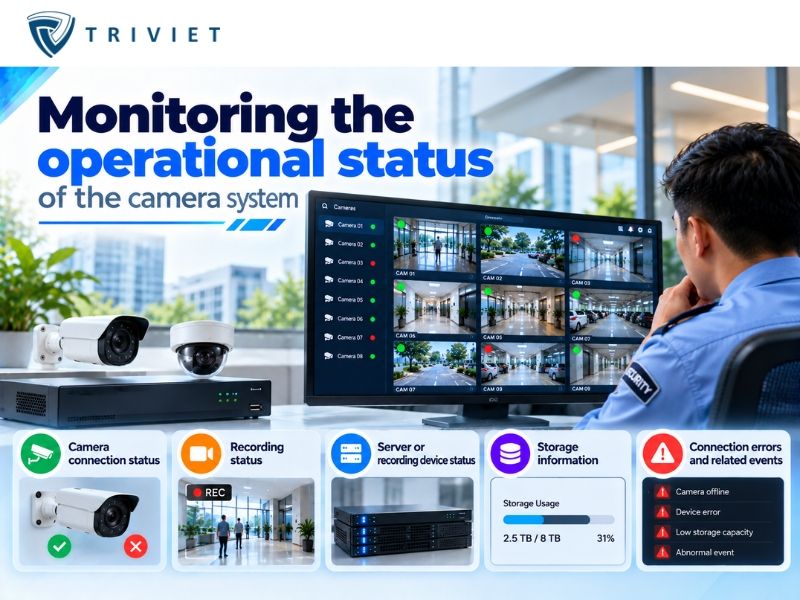
Commonly monitored conditions include:
Camera connection or disconnection status.
Recording status.
Server or recording device condition.
Storage information provided by the system.
Connection failures and related events.
For example, when a camera loses its network connection, the software may display an abnormal status or generate an alarm according to its configuration.
This information helps technical personnel identify devices requiring inspection, reducing the risk of cameras remaining offline for extended periods without detection.
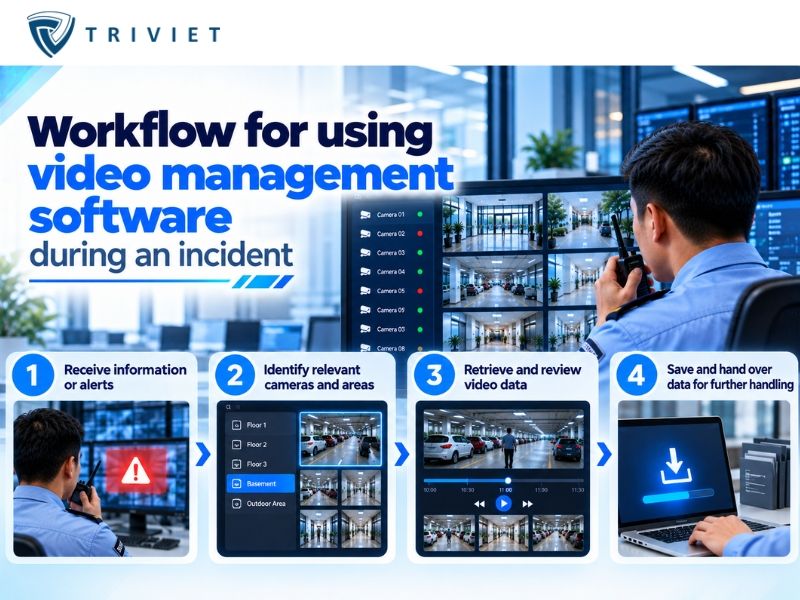
The value of VMS software becomes particularly clear when security personnel receive, investigate, and respond to incidents. The following is a reference procedure for retrieving surveillance footage in a building.
Security personnel may receive information from managers, on-site staff, or alarms displayed in the software.
For example, the security department receives a notification about an incident requiring investigation in the basement.
At this stage, it is necessary to identify initial information such as the location, time, and nature of the incident. If an alarm originates from the camera system, personnel should check the event type and related equipment.
After receiving the information, personnel use video surveillance management software to locate cameras with suitable viewing angles. Grouping cameras by floor or area helps identify the relevant devices more quickly.
For example, for an incident in the basement, personnel may select cameras near entrances, movement routes, or the reported location.
The actual field of view must be checked to determine whether the cameras captured the relevant area.
Personnel select the time range to investigate and retrieve recordings from the relevant cameras.
During playback, footage from multiple viewing angles can be compared to establish how the incident unfolded.
For example, one camera may capture the basement entrance, while another monitors the area where the incident occurred.
Comparisons should be based on the system's timestamps. If time synchronization between devices is inconsistent, the investigation may become more difficult.
For situations requiring documentation, personnel should record the cameras, timestamps, and details of the footage reviewed according to internal procedures.
Once the relevant footage has been identified, authorized personnel may export or preserve the data using the software's supported functions.
This process should ensure that:
Only authorized users perform these operations.
Data is used for its intended purpose.
Recording timestamps and sources are documented.
Data handover follows the organization's management procedures.
For footage required for verification or evidence, particular attention should be paid to preserving the original recordings, controlling duplication, and documenting the chain of custody.
The software supports data retrieval, but incident assessment and response remain the responsibility of authorized personnel.
VMS software can be deployed in various facilities that require camera and video data management. Depending on operational characteristics, its functions can be organized according to specific surveillance procedures.
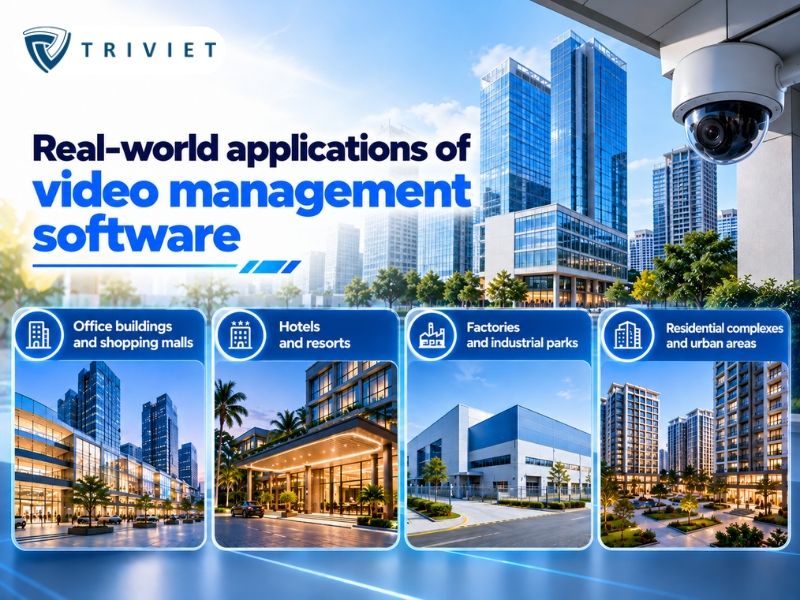
In office buildings, video surveillance management software helps security teams monitor cameras in lobbies, corridors, entrances and exits, basements, and other common areas.
Footage can be organized by floor or functional area, allowing personnel to switch between camera groups when needed.
When an incident occurs, security teams can retrieve recordings by time and location to verify information.
For shopping centers with multiple areas, assigning permissions by camera group allows personnel responsible for each area to use the system according to their duties.
In hotels, VMS software can support video management in lobbies, reception areas, shared corridors, parking areas, and other locations where surveillance is permitted.
Security teams can use the software to monitor live footage or review recordings when receiving reports of incidents involving security or property.
Because hotel environments directly involve guest privacy, camera placement and access permissions must be strictly controlled.
Cameras must not be used in private spaces such as bedrooms, bathrooms, or areas where recording is prohibited.
In factories, cameras may be installed at entrances, warehouses, production areas, and locations requiring security surveillance.
Video surveillance management software helps organize cameras by workshop, area, or equipment group.
When an incident requires investigation, personnel can search recordings by time and compare footage from multiple locations.
For facilities with widely separated areas, a centralized management interface makes it more convenient for security teams to access video data, depending on the network infrastructure and software architecture.
In apartment buildings and urban developments, VMS software can be used to manage cameras in lobbies, basements, corridors, entrances and exits, and public areas.
For projects with multiple buildings, cameras can be grouped by building or zone.
For projects with a large number of cameras or devices distributed across multiple buildings, a centralized camera system helps organize devices and video data within a unified management architecture.
When an incident requires investigation, management personnel can identify relevant cameras and retrieve recordings according to their assigned permissions.
Centralized management should be accompanied by clear policies defining who is authorized to view, export, and use video data.
Not every VMS platform is suitable for every camera system. Before selecting software, it is necessary to evaluate compatibility, equipment scale, and functions required for actual operations.
Video surveillance management software must be able to connect to existing cameras, NVRs, or other recording components.
Factors to check include:
List of compatible devices.
Connection protocols and methods.
Firmware versions.
Video stream reception capabilities.
Supported control functions and events.
Some cameras may transmit video to the software without supporting all advanced features through the integration method being used.
Therefore, actual compatibility should be verified rather than relying solely on protocol support information.
System scale affects server configuration, software licensing, and network infrastructure.
Before deployment, it is necessary to determine:
Current number of cameras.
Number of cameras expected to be added.
Number of users.
Simultaneous video viewing requirements.
Bandwidth and storage capacity.
System expansion plans.
For facilities planning to add floors or areas, a suitably scalable solution should be selected to minimize architectural changes when new equipment is introduced.
Playback functions must support the security team's incident investigation procedures.
Criteria to consider include:
Searching by camera and time.
Event-based searching when supported.
Playing back recordings from multiple cameras.
Exporting video according to user permissions.
Managing retention periods.
Retrieving data in systems with large numbers of cameras.
For facilities that frequently need to review recordings, the search interface and data retrieval capabilities should be carefully evaluated.
Video data may contain images of people, vehicles, and activities within a facility. Therefore, security is an important requirement when deploying VMS software.
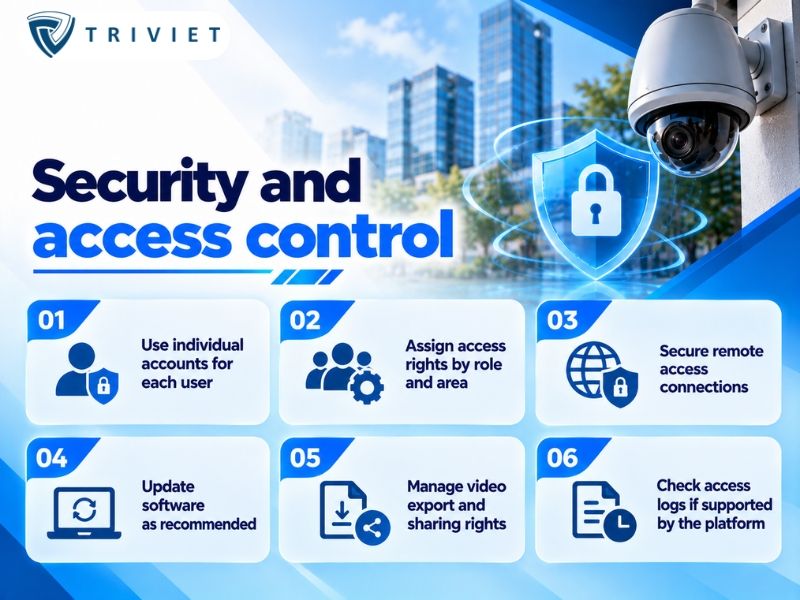
Measures to consider include:
Using individual accounts for each user.
Assigning permissions by role and area.
Securing remote access connections.
Updating software according to recommendations.
Managing video export and sharing permissions.
Reviewing access logs if supported by the platform.
Additionally, operators should establish data retention and usage policies consistent with surveillance purposes and relevant legal regulations.
Tri Viet Controls provides solutions for security systems and camera management, including video surveillance management software products.
Within its camera management software portfolio, Senstar Symphony 7 is one of the platforms that can be considered when exploring VMS solutions. Specific functions should be verified according to the software version, license, and deployment configuration.
When selecting software for a facility, requirements to identify include:
Number of cameras to be managed.
Existing cameras and recording systems.
Live viewing and data retrieval needs.
Event and alarm management requirements.
Scope of user access permissions.
Future scalability and integration capabilities.
Choosing the right solution helps align the video surveillance system with the workflows of security personnel and operations management.
Video surveillance management software does more than provide live video viewing. It also supports recording searches, event monitoring, access control, and data retrieval when necessary. When properly deployed, the software helps security teams manage camera systems more conveniently and provides information to support incident response.
Contact Tri Viet Controls for advice on video surveillance management software suited to your existing camera system, facility scale, and actual operational requirements.







Please leave your information, we will contact you to complete the order!